
Discover more with the AfterAthena Hub
Explore six powerful features designed to make the AfterAthena Hub your go-to tool for smarter, faster support. Watch our quick how-to videos and unlock tips to help you get the most from your Hub, whether you're just getting started or looking to improve how you use it.
Hub Top Tips
- Events and training opportunities are posted on the Hub, so you can find out what’s going on, and register your interest or book your place. Just click the ‘events’ tile from the home screen.
- Seen something and can’t remember where? The Hub stores past event recordings so you can watch back at your leisure and revert back to find the information you’re looking for. Simply navigate via the ‘events’ section.
- Did you know, you can like, share and comment on posts in your social feed, as well as share articles and events with colleagues by clicking the button in the bottom left corner of the page?
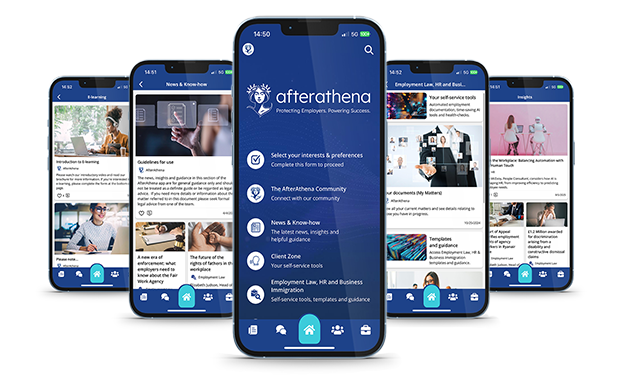
- Access information, news, guidance and documents on the go by downloading the app version of the AfterAthena Hub from the Apple App Store or Google Play Store for free.
- Add the Hub to your favourites or bookmarks bar so you have easy, instant access when you need it. You can even adjust your computer settings to open the Hub automatically when your turn on your machine, or load your browser.
- The AfterAthena Hub allows you to message your adviser directly. Simply find them in the directory, along with any of your peers you’d like to strike up a conversation with.
Hub feature 1: Automated employment documentation
See how to quickly generate legally up-to-date employment contracts and settlement agreements. The tool guides you step-by-step, helping reduce errors and ensuring compliance, so you can create documents with confidence and save time.
Hub feature 2: AI tools
Find out how to streamline HR and employment tasks with the help of our powerful AI tools. From building tailored policies to generating disciplinary questions and HR letters, these tools are designed to save time, reduce risk, and support best practice, all with just a few clicks.
Hub feature 3: Templates and guidance documents
In our next weekly Hub feature series, AfterAthena solicitor, Nikita Passi, shows you how to access and use the ‘Templates and Guidance’ section within the AfterAthena Hub, covering employment law, HR, and business immigration. You’ll see how to navigate the feature, search for relevant documents, and use step-by-step templates and practical guidance to manage key processes efficiently and compliantly.
Hub feature 4: AfterAthena Partner Services
Join our head of employment litigation, Natalie Parkinson to discover AfterAthena’s trusted third-party solutions, designed to support your business beyond day-to-day HR. From anonymous whistleblowing hotlines and workplace mediation to recruitment checks and e-learning modules, these services help safeguard, develop, and support your team effectively.
Hub feature 5: Community Groups
Get to know how to connect, share, and collaborate with peers with this week’s Hub feature how-to video with associate solicitor, Charlotte Carey. You can join community groups based on your interests, post updates or questions, and stay engaged with relevant industry conversations, all designed to help you stay connected and supported.
Hub feature 6: Community Focus
Uncover the new Community Focus feature. A space to showcase your business, share insights, and learn from peers. It's designed to foster connection and collaboration with in the network, helping everyone to grow and thrive together.
Don’t have access to the Hub yet? Download the free version via the your App Store or talk to us today to explore your upgraded options.